

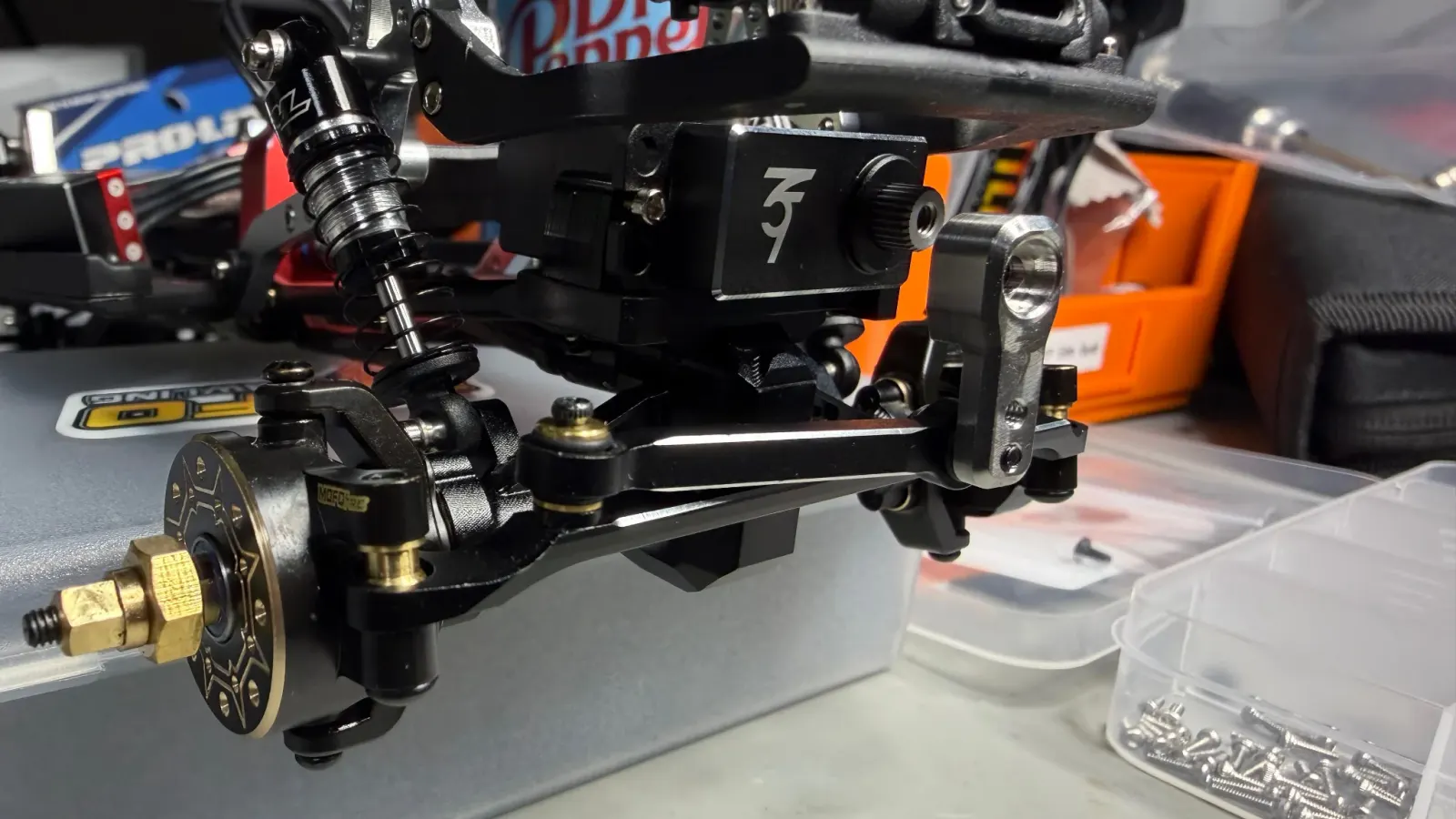
Swapping the SCX24 servo is the highest-impact thing you can do to the truck. It's also one of the easier installs once you know the steps. Modern SCX24 builds are mostly plug-and-play: aftermarket servos come with a JR plug that drops straight into the receiver, and aftermarket 2-in-1 boards (Furitek, INJORA MBL32) have a proper servo header. No soldering required in most cases. Plan on about an hour your first time, less once you've done a few.
If you haven't picked a servo yet, start with the best servos buying guide. For background on torque, voltage, and splines, see the servo explainer.
Tools you'll need
- 1.3mm hex driver (body and most chassis screws)
- 1.5mm hex driver (most aftermarket servo mounts use M2 hex)
- 2.0mm hex driver (some skid and axle screws)
- Fine Phillips driver (stock horn screw)
- Flush cutters
- Blue threadlocker (Loctite 242). Never red on M2 hardware.
- Programming card if your servo is AGFRC, Reefs, or 3Flow9RC. Around $15, reusable forever.
Confirm the mount before you start
The SCX24 platform has two main servo footprints and they don't interchange:
- Stock-tray micro (around 23×12×24mm). Fits the stock tray with no aftermarket mount. eMAX ES08MAII, INJORA INS012G, INJORA INJS480, EcoPower 827. Easiest install.
- Larger “wing” servo (around 32×12×27mm). Needs an aftermarket mount. 3Flow9RC Torrent, AGFRC A20CLS / A20BHM, INJORA INJS11, Reefs 99, Mofo ServoBeast.
The mistake I made early on: buying an A20CLS or INJS11 expecting it to drop into the stock tray. It won't. The larger body is too tall and too long. Buy the mount in the same cart as the servo.
1. Center the servo before you touch the horn
This is the single most-skipped step and it causes most “my steering only turns one way” threads on Reddit. The servo's electrical center (where the radio's neutral signal drives it) almost never matches where the output shaft is sitting in the bag. If you bolt the horn on first, the horn ends up off-axis and your steering travel is asymmetric.
Two methods:
- With a programming card. Plug the servo into the card, power it, hit Center (or Neutral, depending on label). The shaft rotates to electrical center and holds. Slide the horn on at the angle you want, blue threadlock, tighten.
- With your radio. Plug the servo into channel 1 of a powered receiver. Make sure trim is at zero and the steering stick is centered. The servo jumps to center. Don't move the stick. Once it's on and centered, THEN install the horn.
Get this wrong and the servo will sit stalled at one steering endpoint, drawing peak current, generating heat, and stripping gears. This is how cheap servos die in their first weekend.
2. Remove the body, disconnect the battery
Unscrew the body posts, lift the body off. Unplug the battery before you touch anything. Take a photo of the current wire routing. You'll thank yourself later.
3. Unplug the stock servo
On most current SCX24s and any aftermarket 2-in-1 board, the servo plugs into a 3-pin header on the board (signal, +V, ground). Pull the plug, then unbolt the stock servo from the chassis tray. Done.
If you have an older first-generation SCX24 where the stock servo was wired directly to the board, you have two options: solder a JR plug onto the existing leads so future swaps are plug-and-play, or just replace the whole 2-in-1 board with an aftermarket unit that has a proper servo header. I recommend the latter. It's a one-time cost that turns every future servo swap into a 10-minute job.
4. Mount the new servo
Install your new mount per its instructions (M2 hardware, blue threadlock on every screw). Drop the servo in. Some mounts have a defined orientation for the wire exit; some don't. Run the wire toward your 2-in-1 with enough slack that the chassis can flex without pulling on the joints.
Plug the new servo's JR connector into the servo header on your 2-in-1 board. Confirm orientation matches the silkscreen on the board (signal, +V, ground). Most boards key the connector so you can't plug it in backwards, but double-check before you power up.
5. Set endpoints with the program card
If you bought an AGFRC, Reefs, or 3Flow9RC servo, this is where the program card pays for itself. Plug the servo back in, power up, set endpoints just inside the steering knuckle stops on both sides. The default endpoints are usually too aggressive. Reducing them by 5 to 10 percent keeps the servo from stalling against the linkage stops every time you hit full lock. Soft-start is also worth enabling if your card supports it.
6. Replace the steering link
While the chassis is open, swap the stock plastic drag link for an aluminum or brass one. Hot Racing, Treal, and INJORA all sell good $10 aluminum links. 3Flow9RC sells rolling steel links that hold up under comp use. A new servo into a flexy stock link wastes a chunk of the torque you just paid for.
7. Install the horn
Pick a horn angle that gives roughly equal Ackermann travel each way. Slide the horn on the spline (25T mini for almost all wing servos), blue threadlock on the screw, tighten while holding the horn so you don't backdrive the gears. Use the included servo horn screw, not whatever you find on the bench. They're usually a specific length to clear the case.
8. Wire dress and bench test
Plug the battery back in, leave the body off, and check that:
- Steering moves left and right without binding.
- The servo doesn't hum or stall at either endpoint (sign you set endpoints too far).
- The horn isn't fouling on shocks or links at full lock.
- The wire isn't pulled tight when you flex the suspension.
If anything sounds wrong, unplug immediately and re-check. Servos in distress draw a lot of current and don't tell you they're dying until they've already died.
9. Body back on, drive it
Reinstall the body, give the truck a few minutes on a flat surface to confirm normal steering response, then take it out and crawl. The improvement is immediate. Anyone who's only driven a stock SCX24 is going to feel like a different truck.
Where the servo install sits in the overall upgrade plan: see the first upgrades guide. Next install you should do is probably tires, then real charging gear if you haven't already.